The best way to access Picasa on your W8 tablet

Picasa HD is a Picasa photo viewer that will allow Windows 8 users to navigate easily through their photo collection, create slide shows, and share their images with their nearest and dearest - without needing to visit picasaweb.google.com.

Features

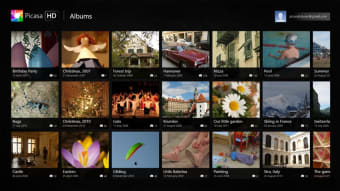
After logging into your Google account, Picasa HD gives you access to all of the photo albums you've uploaded to Picasa. You can browse photos at your own pace, or use the slideshow feature, which adds transition effects between each of the shots.

Beyond being "just" a simple photo viewer, Picasa HD will also allow you to create and manage photo albums. You'll be able to add photos to albums and edit information about them (name, description, date, etc.) all without visiting the web version of Picasa.

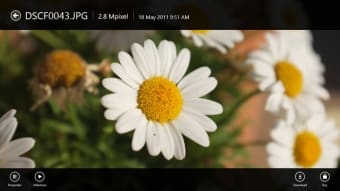
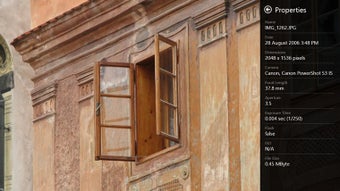
Picasa HD will also allow you to delete photos, access and edit the information attached to images, zoom in on pictures and download them to your PC or tablet. Don't forget that there's also a full screen option, so you can get the most from your screen space.

Getting started

If you've got a touchscreen device, you can take advantage of its features to use the famous pinch-to-zoom or swipe though your images.

Appearance

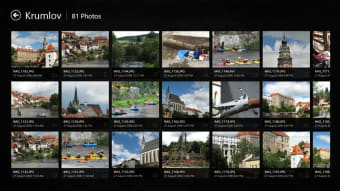
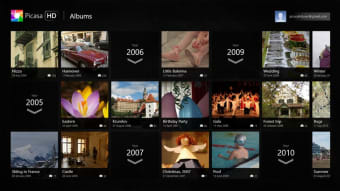
Picasa HD definitely takes a back seat to your photos. It's simple and fuss-free, in order to show your images off to their best advantage. The majority of the interface is taken up by thumbnails of your images, allowing you to easily see the photos you are working with.

Conclusion

As Google doesn't currently offer an official app for Picasa on Windows 8, Picasa HD is the next best option for viewing the photos in your Picasa account on a tablet or hybrid device. It will allow you to view and edit information about your photos, as well as adding new images to your collection, all without having to visit Picasa online.


  • Pros

    • Slideshow function
    • Create and manage albums
    • Good for touchscreen devices
  • Cons

    • Not many album sorting options
 0/6

App specs

  • License

    Free

  • Latest update

  • Platform

    Windows

  • OS

    Windows 8

  • Language

    English

  • Downloads

    386.7K

    Last month's downloads

    • 1.6K
  • Size

    17.39 MB

  • Developer

Program available in other languages


User reviews about Picasa HD

4.1

6 reviews

Add review

Main reviews for you

  • Anonymous user

    Picasa HD is wounderful software and easy to use. I have been using this software since long time. Simple and useful even for children. Just copy the clicked pics on your system and this software will do the rest according to your requirement.


  • Anonymous user

    It is a great program to scan my computer for all the pics which are littering my hard disk. It allows me to get rid of pics I don't want to keep.

  • Anonymous user

    VERY GOOD APPS. Very good app i like it and use us and advice another that us this apps

  • Anonymous user

    Great Picasa client, nice interface, easy to use.. I am using Picasa HD a while now and the app performance is really great. Works as advertised. It is a full featured Picasa Image Viewer. Photo editing features are missing, but I have other apps for that purpose. Pros: Nice interfaceEasy to useDisplaying photos on the MapSlideshowsCan also create albums / upload photos Cons: Lack of built in photo editor

  • Anonymous user

    Best Picasa viewer for Windows 8. It is a very good Picasa client for Windows 8. It presents my albums and photos in nice and clean metro style and I can enjoy my photos in high resolution on my TV. Some basic editing funtions would be good, but I have other apps which can do that. Slideshow with zoom effect is also awesome. Pros: Nice and clean UIEasy to use Cons: Some basic editing options

  • Anonymous user

    Horrible app, don't waste your time.. This is a horrible alternative to the Picasa that I have used in the past. I love Picasa for all my picture editing and sharing needs, but since upgrading to Windows 8, I can't find a similar program. Since this Picasa HD was all that was available, I downloaded it giving it a try. Not worth the time I have spent downloading it. There is no editing of your pics in this app, just editing of the information in the albums. And sharing....good luck. All in all, not even worthy of the name Picasa.

More

You may also like

Alternatives to Picasa HD

Explore Apps

Latest articles

Laws concerning the use of this software vary from country to country. We do not encourage or condone the use of this program if it is in violation of these laws.
Softonic

Is Picasa HD safe?

100/100

Score result: Clean

This file passed a comprehensive security scan using VirusTotal technology. It is safe to download.

  • Virus free
  • Spyware free
  • Malware free
  • Verified by Security Partners

    VirusTotal logo

Scan Info

Last scan
Saturday, December 30, 2023
Scan provider
VirusTotal · Full report

File Integrity

File
picasa.exe
SHA256
3c44c91827baafd3555dc489b17b2f4002a902e19cf4137d09201e59c0df83da
SHA1
90b9c84c2f36feb121a67ea45668bbe00c557b15

Softonic security commitment

Picasa HD has been thoroughly scanned by our advanced security systems and verified by industry-leading partners. This file comes from the official developer and has passed all our security checks, showing no signs of viruses, malware, or spyware. For more information, visit our Security and Trust Center